Kamis, 10 Februari 2011

BlackBerry 7290


Add Bluetooth and an extra radio band to an established line up of solid corporate messaging device and you have the Blackberry 7290 from Research in Motion. For those who missed the Blackberry mobile revolution, the Blackberry is the quintessential mobile messenger. Long before Microsoft, Nokia et al dreamt of combining phone and PDA RIM was peddling their own unique blend of PDA coupled to an always on data connection over the air-waves. The early units, in the late 80's, relied on the slower paging networks but still created the same always-on email experience that the newer phone-based units offer.

RIM BlackBerry 7290
This Blackberry comes from T-Mobile at a cost of $349 plus $30-80 per month for the plan, the 7290 adds $50 to the previous non-Bluetooth model. The 7290 is also available from Cingular with similar pricing. Is it worth the extra cash? That depends one whether you use the phone features. Read on…

Design and Ergonomics
Today's Blackberry owes its design more to a long and proven linage of screen and keyboard combo than any new-age art inspired design; it's a corporate device and as I'll say a few times in this review is born of that goal; to be a mobile messenger in a corporate world. Its high points are that it's been refined and refined to such a height that it's no surprise that it works so well ergonomically. Every button has its purpose, there are no extra buttons, switches, dials or 'flappy' bits to break off. This year's model features a lighter smarter metallic blue-grey color finish than the Black and Blue models of last year. It retains a smooth curved form that fits the pocket far better than many 'stylish' phones and PDA's that feature sharp squared off edges. It spreads its weight out evenly over its size to ensure that no part presses into you; a neat trick that hides its 139g/4.9oz weight giving the impression of a much lighter unit.

side view of BlackBerry 7290

The Blackberry 7290 works well in both the left and right hands; navigation is via a side mounted scroll-wheel and most operations can be completed single-handedly; the optionally backlit screen is just enough at 240x160 (65mm diagonal) resolution but there's no touch screen so many operations require a few intuitive pushes of the wheel to get the desired action. Heavy users may develop a small callous on the wheel finger!
The keyboard is great, it has a responsive enough feel without too much resistance and flat keys that allow the thumbs to slide from key to key; not as fancy as Palm or HP keyboards but more efficient for it.

The plastic construction is tight and solid, the door to the removable battery fits closely and the lack of touch screen frees the 7290 from that fragile, 'don't scratch my screen!' feel that Pocket PC's have and lends to the units overall 'pocket-ability'.

On the side you'll find a nice standard mini-USB connector for charging, upgrades and desktop sync; There's also a compact charger complete with US, Euro and UK adapters reinforcing the world-phone feel.
The kit includes a 'desktop stand', this isn't a docking station but incorporates a inset where you can press in the included USB sync cord. It's decidedly low rent.

Also of questionable need is the belt holster; it features a magnet and switch that causes the Blackberry to switch modes for Ringer and notification when holstered. However, in the holster on your hip I don't think that you're necessarily making the right fashion statement.

Phone Features and Reception
The difference between this model and the previous is all in the radio department; Quad-band GSM ensures better coverage across both of the US GSM frequencies; 850 and the older 1900Mhz plus full coverage in Europe on the 900 and 1800Mhz bands, but here is where later Blackberry's had a chance to win the Phone/PDA combo battle… but lost. There are a couple of problems with the Blackberry's Phone feature, the first is a weak radio and the second a poor phone user interface. It's a shame as I'd consider the Blackberry my only device if it were stronger in this area. In the US where GSM coverage is still light there are areas where I can pull in enough of a signal on most phones and PDA/Phones to hold on but the Blackberry is noticeably weak. I've tried a few units so don't feel this to be mine alone. The problem is that it's too far under the bar to rely on, it doesn't handle calls in the car and at home where I have usually one to two bars the Blackberry is 'Searching…'. Careful positioning gives me a bar to receive my email with but that's no use for calling. Unless you're in a great area and don't plan to take calls whilst traveling this isn't a device that you can conduct telephone business on.

On a recent trip to the UK, where five bars are the norm, the Blackberry made the grade with call quality on a par with most phones and better than some; the larger case affords a reasonable speaker giving depth and volume. No speaker phone though. So if you plan a trip around Europe, you could get away with packing only one device… along with your tooth-brush.

The user interface for the phone is not strong; it is, like the rest of the software a bit, well, 'agricultural'. In a world of icons and animation the Blackberry is a little 'MSDOS' for want of a better term. I don't mean to say that I don't like it, it's actually a little retro but its heavy text based displays and its limited navigation options leave it bereft of the now expected neat features like T9 dialing and an easily accessible speed-dial. I do believe that these features could be implemented.

Where the interface claws back some ground is that you can call contacts from the Contacts feature as well as from email and web pages. Once on a call an optional Bluetooth headset works well allowing you to hold the unit either in front of you so that you can tap in notes about the call, or in my case above your head at a 73.5 degree angle by the back window where I get a signal.

The GSM phone also hosts the GPRS data connection required to receive email; at fast modem speeds it's not EDGE, EVDO or Wi-Fi throughput but that doesn't matter as the email flows in continuously and is very compressed. Web pages on the integrated browser strain the bandwidth the most but again they're compressed and well, you're on a tiny pocket device; it's good enough!

Horsepower and Performance
Want to know why the battery life is so good? A. The CPU is as fast as a Tortoise… but, that's ok, it is, as Rolls-Royce would say when asked about the horsepower from their engines "sufficient". The only time I could outrun it was whilst carrying out a full re-sync of all my mail, contacts and calendar, only then where key presses unresponsive. In day-to-day operation it does make very good use of the CPU, one thing that you don't immediately notice is that it is always on, the display never goes off, the CPU is always running, constantly receiving messages, something that you just can't do with a fast and power hungry processor. When needed the operating system has its priorities right too, when a call comes in the unit instantly comes alive and switches to the Phone application, something that some other Phone/PDA's struggle with.
Storage is integrated only (no expansion slot); 32Mb of usable memory for emails (plain-text), calendar and contact information. It is, 'sufficient' for thousands or contacts and a month of emails.

Display, Gaming and Multimedia
Gaming? The Blackberry comes with a whole host of games; 'Email', 'Calendar', 'Contacts' to name but a few. Each one performs very well and, they even throw in a Tetris type game for when you've finished emailing… oh wait a minute no, how about we SMS a few more times? One thing the Blackberry doesn't need is a suite of games; it hasn't the CPU or display to keep up. I was pleasantly surprised though to discover just how much extra business software titles you can get for the Blackberry; there are RSS readers, enhanced word processors and even financial charting packages. One of my favorite add-ons is the Instant Messenger application from RIM themselves; the always-on GPRS connection really makes IM work on a mobile device.

Guess what software you can't get for the Blackberry? Answer: anything multimedia. As there is no storage option there is no where to store MP3's and video so the hardware has never supported it. It's a shame as a little mini-SD slot and a nice music player would be a great touch.
The screen is 65mm (2.5") diagonal and has a resolution of 240x160; it's just enough for emails and the built in fonts make good use of that modest resolution. The strong point for the display is that it can operate without its backlight in all but the dimmest light. This adds battery life and simplifies use; you don't have to press a button to read email, you just glance at it.

Bluetooth

Bluetooth support in the 7290 is new to this form factor Blackberry having first seen the light of day in the more phone like 71xx series. It's again a bit of a text based implementation but, it works and works well. Support for Headset and Hands-Free is good… it works which is more than can be said of the Microsoft Stack in the PocketPC and Smartphone. It has an odd additional switch for each paired device; 'Trust' that set to the default 'No' requires user confirmation when any device tries to attach, a small problem.
The Bluetooth implementation doesn't support OBEX so we can't send contacts yet. Nor does it offer itself as a Dial-up device so it won't add GPRS to your laptop.

Battery Life

With a modest battery that looks about 750mAh you'll get a good 4 hours talk time and a week on standby, and remember that standby includes receiving emails… Now do you want that fast processor? No, I didn't think so. It's quite liberating to know that I can take a two day trip over the weekend without taking the charger. A spare battery will not break the bank and nor would a simple 5-volt car charger.
In typical day-to-day use the Blackberry should see the charger every couple of days, more to avoid disappointment should that disaster occur that keeps you on the phone for hours than for the Blackberry's benefit. If you don't use the phone feature, you could probably charge it at weekends only!


Software
As shipped the unit came with an older OS, a free update to Blackberry firmware 4.0.2.32 can be downloaded and applied.
The Blackberry works by connecting to the Blackberry Servers, not, as is often thought, your server. To get email, contacts, calendar and tasks to the handheld you have to send them to Blackberry for onward transmission. Out of the box, the included desktop software allows you to synchronize with most desktop PIMs though only email is synchronized over the air, calendar, contacts and tasks require that you sync with the included USB cable. Don't forget though that to sync email your PC must be left on and logged in so it's no good for laptop users! In this mode, a Blackberry can be used by anyone but really, the Blackberry was groomed for the corporate world and whilst you can use web mail and sync from your desktop, an investment in Blackberry Enterprise server is the way to go. Using software that runs on a Windows Server, the Enterprise software will collect mail, calendar, tasks and contacts from Microsoft Exchange or Lotus Notes and deliver it to the Blackberry system for delivery to your handheld. In this mode the Blackberry works; as an IT manager you can add a user to the Enterprise server, have them pick up a Blackberry where ever they are and simply enter email address and password and they're off, there's little in IT that's simpler than that. A home user is not going to get that level of simplicity and convenience, another area in which I feel that Blackberry sell themselves short.

Always-on Push Email
Blackberry make a lot of their always-on push email service and it is neat to watch email arriving in real-time but, it's only 'neat' I'm not totally sold on it's advantages, my Pocket PC devices check each hour during the day and with time flying by I seem to have new messages each time I look so I wouldn't rule anything out that didn't do 'Push' email.
Other than PIM functionality the Blackberry doesn't include any additional software, however look outside and you'll find a whole raft of business oriented applications to boost functionality.

Conclusion
If you're looking to loose your phone and PocketPC or Palm powered PDA in exchange for a Blackberry, you may be disappointed, especially if you're any kind of power user; you'll miss the MP3 player, the word processor and the ability to load up fancy GPS software. If you plan to keep your mobile phone but need to add remote email and calendaring to your life and especially if you're the type that buys technology for the job rather than for fashion then you're in luck; the Blackberry offers strong email, calendar and contact management in a tough and pocket-able form that doesn't need a tech-head in tow to keep it running and, having recently seen them in the hands of the FAB-5 and George Clooney you might hit the fashion note too.


Specs:
Display: 2.5" 65k color display. Resolution: 240 x 160 pixels.
Battery: Lithium Ion rechargeable. Battery is user replaceable. 900 mA. Claimed talk time: 4 hours. Claimed standby: 9 days.
Performance: 32 MB Flash ROM and 4 megs RAM.
Size: 4.5 x 2.9 x 0.9 inches. Weight: 4.9 ounces.
Phone: Quad-band: 850/900/1800/1900 MHz GSM for voice and GPRS for data.
Audio: Built in speaker and mic (for phone use) and 2.5mm standard headset jack. Supports vibrating alerts, on-screen notifications and LED flashing.
Networking: Bluetooth, supporting headset and hands free profiles.
Software: RIM's own operating system and basic application suite including messaging/email, PIM applications and web browser. Push email requires BlackBerry Enterprise Server or BlackBerry desktop software.
Expansion: None.
Input and Navigational Aids: Backlit 33-key QWERTY thumb keyboard and thumb operated trackwheel and escape key on right side of unit. 

RIM BlackBerry 7280 Review


The BlackBerry line revolutionized messaging several years ago when pagers were the lackluster standard. Since then models have evolved and now function both as mobile phones and email-anywhere devices. RIM's ever-popular thumb keyboard has remained much the same over the years, and that's a good thing. You can check and send emails and SMS messages anywhere you have coverage, and the unit will let you know when new emails have arrived. While you can do email on the go using smartphones, none offer the BlackBerry push email feature out of the box.
While the BlackBerry doesn't fit the classic definition of a PDA, it does offer good PIM support and desktop syncing. Unlike a PDA or smartphone, it doesn't double as a pocket multimedia player and you won't find a wealth of 3 rd party consumer oriented software to extend the platform in the manner of Palm OS and Pocket PC devices.

Understanding the BlackBerry Flavors

RIM makes many BlackBerry devices for most of the carriers in the US . The BlackBerry 7200 series work on GSM/GPRS networks while BlackBerry 7700 series has models that work on either GSM or CDMA networks. RIM also makes the 7510 for Nextel networks.
The BlackBerry 7200 series is available through all major GSM carriers in the US . RIM released the device to each carrier with a different model number. Here is the break down:
The BlackBerry 7210 works on 900/1900 MHz and is available on AT&T network.
The BlackBerry 7230 works on 900/1800/1900 MHz and is available on T-Mobile network.
The BlackBerry 7280 works on 850/1800/1900 MHz and is available on both AT&T and Cingular networks in the US and Rogers Wireless in Canada . The Blackberry 7290 replaces the 7280.
BlackBerry 7280
BlackBerry 7280 back

Ergonomics and Design

Though it's called BlackBerry, the 7200 series devices actually have a deep marine blue casing with a silver screen bezel and keys. The design is clean with rounded edges and no external antenna. The display and thumb keyboard are located on the front of the unit, with an integrated speaker located above the display. The integrated mic is located on the bottom edge of the unit. 

Display and Battery

The BlackBerry has a 240x160 color screen that's capable of displaying 65K colors. Though it uses a limited color palette and has a matte display, color saturation is amazingly high to the point that it looks like picture painted on the screen. The deep colors and large icons make the display extremely easy to see both indoors and out. You will not only find shortcut icons for Message, Phone and PIM applications on the main display screen, but also icons for keyboard lock, turning the wireless off and power off functions.
The battery is user replaceable (sorry, RIM does not disclose its capacity in mAh). The battery life is amazing on this device, provided you don't talk on the phone for hours everyday. We found that the claimed 4 hours talk time and 10 days standby time is on target.

The Double Identity

The beauty of having a BlackBerry is not only to get email pushed to you anywhere at anytime, but also to integrate your currently email accounts with BlackBerry so that you can receive and send email from your existing corporate email account or ISP email account.

If you are integrating your ISP/POP3 email account, the wireless carrier will provide the services for you via BlackBerry's Web Client. You can add up to 10 email accounts on a single BlackBerry with Web Client, including Outlook, Lotus Notes, MSN, Hotmail, AOL and IMAP accounts as long as your carrier supports it. To add additional applications to your BlackBerry, you will need to install the Desktop Manager from the included CD, which gives you an Application Loader. You can sync the handheld with the desktop using Intellisync in the Desktop Manager and configure the content you wish sync. The Desktop Manager also has Backup and Restore applications.
If you are using corporate email accounts on the BlackBerry, your IT department can set up your handheld with the BlackBerry Enterprise Server or you can use the BlackBerry Desktop Redirector to configure your account settings.

Applications

BlackBerry has a very simple and easy to use interface. When you turn on the device, you will see the icons for all the applications on the screen. Use the Trackwheel to select application and press the Trackwheel to launch it. As you highlight the icons, you will see the name of the application displayed below all the icons. Above the application icons, you will find battery meter, signal strength and GPRS status as well as date and time. 


Messages

When you launch this application, you will actually see your email messages, PIN messages as well as call logs displayed by date. You can check and compose email, PIN messages (to other BlackBerry handhelds with PIN numbers) and SMS messages as well as place a phone call in this application. There is also a very nice search function, which makes it easier to pinpoint the email you are looking for if you have long list of emails.

After you open an email, you can perform regular email functions such as reply, forward, delete, save, etc. In addition, if the email body includes a phone number, email address or web URL, you can use the Trackwheel to highlight it and make a call, send an email or open a web page directly from that email. Very convenient! Another convenient feature in this application is that you can type notes to your call log, as well as copy/paste the phone number in the call log to your address book.

To send messages, you can type in a new email address, PIN number or SMS address or use an address in your Address Book. BlackBerry even lets you send messages to email addresses on a web site or in the messages you receive: all you have to do is to highlight the email address, then click on Email to send a message. Reply, Forward and Delete message functions work similarly to desktop email applications. You can choose to not include the original message when you reply to an email. You can also include Copy list and Blank Copy list in your messages. If you delete messages, you can set options to have them deleted only on handheld or both handheld and desktop, and to assign over-write in a conflict situation for either the desktop mailbox or the handheld. You can easily delete all messages prior to a date you set.

BlackBerry supports attachments. You can receive and view MS Word, Excel, PowerPoint and Adobe Acrobat PDF files as well as .txt and .wpd files. You can also view html and zip files if your Enterprise Server is 3.6 SP 1 or later. You will have options to set the display format for the attachment files as well as cache sizes. The viewer actually gives you considerably amount of freedom in configuring the format and layout of the documents.

Sending and receiving SMS messages on the BlackBerry is easy and fast and the built-in keyboard really shines. You can choose a phone number in your Address Book, call log, messages or type in a phone number to send an SMS. The SMS display screen on the BlackBerry is simple and clean. You can scroll through all messages using the Trackwheel. If the list is getting too long, you can delete them using the Remove History function. In addition, you can specify the number of previous messages to appear on your SMS screen. You can also easily forward or resend SMS messages to other phone numbers in your address book or a new number.

Address Book
Address Book on the BlackBerry is a quite flexible application. It provides fields for all basic contact information and you can have up to 3 email addresses, 4 user fields as well as adding notes to the contact record. The Address Book supports Group function where you can categorize and group different types of contacts. You can email to a single email address or to a group of email addresses. The Address Book is also integrated with the Phone, Message and web browser so that you can take actions in these applications using the contact records in the Address Book. If you've stored addresses on your SIM card, you can import them to BlackBerry Address Book easily. You can sort your contacts by First Name, Last Name and Company. If your handheld is set up for Remote Address Lookup on your Enterprise Server, you can even search address in your company database.

Calendar
There are four views in the BlackBerry Calendar application: day view, week view, month view and agenda view. Use the Trackwheel to navigate through your scheduled items, times and dates. When you add a new appointment in the Calendar, you will go to day view and input the subject, location, mark for all day event, start/end date and time, duration, time zone, set reminder and recurrence as well as adding notes. The week view also has time display, and you can select any day and click on New to enter an appointment for that date and time. Very nice layout and an easy way for inputting a schedule. If your handheld is set up to sync to your desktop and your Enterprise Server is 2.1v or later, you can invite attendees to your scheduled meetings on the BlackBerry. Attendees who received your invitation can email you with their responses (accept or decline). 


Tasks, Memo and other PIM apps
Tasks and Memo are simple applications in the PIM group. Tasks allows you to create to-do items with Status, Priority, Due date and notes. Status includes Not Started, In Progress, Completed, Waiting and Deferred. Priority includes 3 levels. You can sort your Tasks by Subject, Priority, Due date and Status.
MemoPad allows you to write notes and memos. You can add, edit and delete memos in this application. Alarm application gives you the option to set daily alarms including weekend/weekday options.

Phone Functions
The Phone application on the BlackBerry is a very capable and full-featured. You won't feel that you are giving up any telephony features for an email-centric device.

You can dial a number from your Address Book or in a message or on a web page. When you launch the Phone application on the BlackBerry, the left side of the keyboard, which also occupied by numbers on top of letters, will turn the numeric mode on automatically. You don't need to hold the shift key to be in numeric mode like you would when you are in message mode. If you need to dial a phone number that does not exist on the BlackBerry yet, press the Space key to bring up a pop-up dialing window. The nice thing about the BlackBerry is that you can use extensions with phone numbers: when you get to the automatic recording on the main line, the BlackBerry will automatically dial the extension for you. Once you have a number, you can access the menu by clicking on the Trackwheel which offers to call that number, SMS that number, copy the number, add to address book, and more actions. The menu also gives you instant access to the Address Book as well as to Call Voicemail. You can adjust volume via this menu when not on a call or use the Trackwheel during a call.

The BlackBerry comes with four profiles: Loud, Discreet, Quiet and Default. It supports only midi ringtones. When an incoming call reaches your BlackBerry, you will see a pop-up window giving you choices of Answer, Answer and Hold, and Ignore. If the person calling is in your Address Book, the BlackBerry will display caller ID info. During a call, you can push the Trackwheel to bring up menu selections to end the call, put it on hold, mute it or to take some notes. BlackBerry makes it very easy to swap calls if you have someone on hold while talking, and to make conference calls if you subscribe to that service. You can add or disconnect any caller during a conference call. Very impressive! You can even type messages during a call, but you can't send them until the call ends.
BlackBerry also offers other phone features such as call logging, call barring, call forwarding in additional to call waiting. You can choose what types of calls to log or block, and set a call barring password. Call barring is only available for SIM cards that have this option. You also have the option to turn off your caller ID.

Web Browser
There are two browser types on the BlackBerry: one allows you to open web pages using your service provider's gateway, and other one uses your corporate Mobile Data Service. You will likely be limited to WAP if you use the browser out of the box via the carrier's service. The web browsing shines when you have Enterprise Server set up with Mobile Data Service. You can download applications directly to your handheld via web browser. It also supports bookmarks, history, and clear cache options.

Conclusion
Pro: The integrated email accounts and always-on wireless email technology are the most attractive features on this device and make it the de facto standard for push email. Sending and receiving messages and attachments is easy thanks to the built-in apps. Very readable screen, comfortable keyboard and long battery life are big winners for this email-centric device. Con: weak browser if you don't have MDS set up. No polyphonic ringtones. Could stand more profiles. 


Specs:
Display: 240x160 high resolution, 65,000 colors, backlit. Viewable indoors and outdoors.
Battery: User replaceable Lithium Ion.
Performance: RIM does not disclose processor information. 16MB flash memory plus 2MB of SRAM. Runs RIM OS, Java-based.
size: 4.4 x 2.9 x 0.8 in. 4.8 oz.
In the Box: The BlackBerry, 2 standard Mini-USB cables, world travel charger, a standard battery, an ear-bud headset, a plastic swivel holster and a desk cradle.
Phone: Tri-Band: 850/1800/1900 MHz GSM/GPRS.
Audio: Built in speaker and mic. 2.5mm standard headset jack. Notification: Tone, vibration, on-screen and LED. Midi ringtones.
Software: Comes with BlackBerry Message app for email and attachments, Phone app for telephony, Address Book, Calendar, Tasks, Memo, Calculator and alarm applications for PIM. It's bundled with a WAP browser. Also comes with BrickBreaker (a Breakout clone). BlackBerry Desktop v3.6.

HTC Inspire 4G


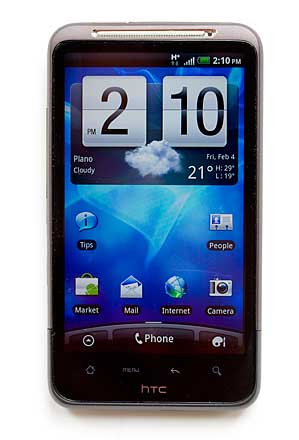
The HTC Inspire 4G is one of our favorite HTC Android phones to hit the market in the past several months. The Aspire 4G is the US counterpart to the HTC Desire HD overseas, and it packs high end specs and luxurious build materials for a very affordable $99 with contract on AT&T. The Inspire 4G has a monumental 4.3”, 800 x 480 SLCD display, a 1GHz Qualcomm Snapdragon second generation CPU, HSPA+ 4G (though not as fast as LTE 4G coming later this year to AT&T) and an 8 megapixel camera that shoots 720p video.  The only things missing from a complete superphone recipe are a front facing camera and a dual core Tegra 2 CPU. Still, the Inspire is quite fast, and in fact it’s one of the fastest among Android phones shipping as of this writing. The HTC Inspire 4G will be available Feb. 13 2011.
HTC Inspire 4G
The Inspire runs Android OS 2.2 Froyo with the latest version of HTC Sense software. Sense continues to be our favorite Android enhancement among manufacturer customizations. It’s tasteful, full of useful widgets and social networking software, and this latest version has a web counterpart you can use to back up settings, find your phone, remote wipe your phone and more.
Design and Ergonomics
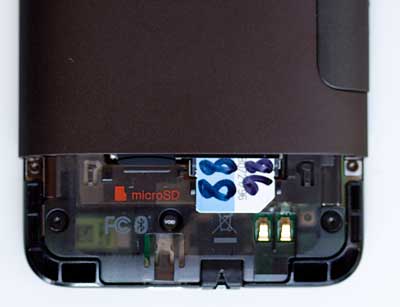
It’s easy to see the Inspire 4G’s roots in the HTC HD2, HTC HD7 and HTC EVO 4G that use the same slim super-slab design with a 4.3” display and liberal use of metal. The HTC Inspire 4G’s casing is made of a single piece of metal—it’s a unibody aluminum alloy design that looks lovely and expensive. The battery door is less than lovely: it’s extremely hard to get off, at least the first few times, and it’s prone to nicks if you pry at it (as you must). The SIM card and microSD card slots are under another plastic cover that slides off toward the bottom. It’s firm but not nearly impossible to remove like the battery cover. Hint: to remove the battery cover, find someone with fingernails and have them pull from the volume rocker area rather than just from the inset pull-off area.
HTC Inspire 4G

The phone has the usual Android backlit capacitive buttons below the display and they work quite well. The power button is up top and the large volume rocker is on the side. We greatly prefer this arrangement to Samsung’s where the power button is on the opposing side of the volume controls; you end up hitting both at once if not careful. Though large, the 5.78 ounce Inspire is comfortable to hold and it feels great in hand. Those of you who hate slippery plastic phones with find the HTC both attractive and easy to keep a hold of. If you haven’t owned a large display phone, it does feel like a pocketful; this isn’t a phone that tucks discreetly away in a tight front pocket.
4G and Calling
The HTC Inspire is AT&T’s first 4G HSPA+ phone. Some may argue whether HSPA+ with its 14.4 to 21MBps top download speeds is true 4G. The standards body has declared it so (perhaps begrudgingly), and on T-Mobile’s HSPA+ we’ve found it extremely fast. Though our phone says we’ve got HSPA+ coverage (there’s an “H+" in the status bar), we haven’t seen speeds comparable to T-Mobile’s 5 to 8Mbps down. Our phone averaged 1.7 to 3Mpbs down and 300k to 1Mbps up with a solid -77db signal: that’s in the range of a 3G HSDPA 7.2Mpbs phone like the iPhone 4 and Samsung Captivate on a good day.  We’ll see if speeds increase as AT&T continues to build out their backhaul. That said, those numbers make for a fast Internet experience, and web pages, apps and email download very quickly. This is the first phone on AT&T to get the mobile Hotspot feature where you can turn the Inspire 4G into a WiFi access point that shares its 4G connection (the iPhone 4 will get this feature via an update on the Inspire’s 2/13/2011 release date). The feature is extremely easy to use and you can set encryption type, name the access point and assign a password. In our tests, we got up to 3Mpbs down and 1Mpbs up with our notebook using the Inspire 4G as its WiFi access point.


Call quality is excellent with full and clear voice on both ends. Volume is quite good as well, though we found the speakerphone a little thin sounding and we wish it were a bit louder for multimedia playback.  As a voice phone, the HTC Inspire is up there with our top voice phones on AT&T such as the BlackBerry Torch and Samsung Focus.
Horsepower and Performance
The HTC uses Qualcomm’s second generation 1GHz Snapdragon QSD8255 CPU with a whopping 768 megs of RAM. The phone has 4 gigs of internal storage but only a bit over a gig is free for your use.  As with the HTC T-Mobile G2, the Inspire has rather a large ROM that self restores if need be, and this uses a good deal of the internal flash storage. AT&T includes an 8 gig microSD card that’s pre-installed in the phone and you can use a higher capacity card if you wish.
The Inspire scored an impressive 1719 on the Quadrant benchmark app that tests the CPU, 2D and 3D graphics and flash storage performance. In comparison, the HTC EVO Shift 4G with a second gen 800MHz Snapdragon scored 1369, the Samsung Nexus S scored 1648 and the Samsung Captivate running Android 2.1 scored 869.
Subjectively, the phone feels very fast with no lags or slow downs.  Flash playback showed better frame rates than we’ve seen in other Froyo + Flash 10.1 Android smartphones, and we found it actually watchable, though still slow to respond to on-screen player controls (watch our video review to see it in action). 3D games are fluid and locally stored video with MPEG4 files up to 800 x 480 resolution encoded at 2Mbps or higher played perfectly. Though you might not feel like the hottest geek in the office once dual core Tegra 2 Android phones hit the market, experientially you won’t suffer from weak performance with the Inspire 4G.


Video Review

Here's our video review of the HTC Inspire 4G. We take a look around the device, test out Flash playback, video playback, 3D gaming and show HTC Sense software.


Display and Multimedia

Who doesn’t love a large display? The 4.3” SLCD display on the Inspire is currently the largest used on traditional form factor smartphones. It’s perfect for watching videos and reading web page text without lots of pinch zooming or squinting. The display is very sharp with good looking text and colorful images. Though not as super-saturated as Samsung’s Super AMOLED displays, we didn’t find ourselves pining for our Nexus S with Super AMOLED. For those of you who’ve checked out out the display on the HTC HD7 (also 4.3”), the Inspire’s is much better with higher contrast, stronger colors and wider viewing angles.

HTC improves upon the basic Android media players and that’s a good thing. The music player features a cover flow presentation and sound is enhanced with Dolby + SRS Mobile. Dolby adds a bit of bass and improves channel separation (noticeable with headphones more than the speaker). The Inspire has an FM radio with good reception that as per usual uses the wired headset as its antenna but you’ll have to supply your own headset since none is included. The video player is tweaked to add a Dolby button and as we noted, playback of locally stored MPEG4 movies was flawless.

AT&T includes their Live TV app, powered by MobiTV. This includes streaming content from news and sports sources and on-demand downloadable full TV episodes. The service costs $9.99/month and requires a WiFi connection for downloadable full episodes and we’d love to see it on the HTC’s large display, but the service wasn’t ready before the device’s official release.
The HTC Inspire supports DLNA but there’s no HDMI port for output to a TV or projector.

HTC Sense and Other Software
AT&T used restraint and didn’t litter the Inspire 4G with bloatware. AT&T Navigator, AT&T Family Locator, AT&T Barcode Scanner, myAT&T, Live TV and YPmobile are on board from AT&T, and we count only YPmobile as bloatware. AT&T and HTC have also included Twitter, Facebook, Blockbuster, Adobe Reader and Quickoffice (MS Office suite).
HTC’s Sense software include their well-known home screen clock with embedded weather widget (yes it snows on the home screen), Friendstream (an excellent social networking widget that streams Facebook, flickr and Twitter updates), wireless control widgets, an RSS reader widget with lots of pre-loaded options but weak controls for adding non-stock feeds, Voice Recorder, HTC Likes, HTC Hub (download free widgets, themes and sounds) and Footprints. Other goodies include a call history app, caller blocking, a very cool desk clock with day and night modes, flashlight and HTC’s customization of contacts (People) that does an excellent job of linking your contacts with your social networking pals (you can choose which contacts to link). 
The usual Google apps are here including Google Maps, Navigation, Latitude and Places, Gmail, email (POP3/IMAP and MS Exchange), the webkit web browser, voice dialing, YouTube, Reader (Google’s eBook Reader), Google Search/voice search and Gtalk. The Android Market is here for app downloads but alas, as per usual AT&T has blocked installation of non-market apps. That means you can install apps from the Android Market to your heart’s content but you won’t be able to install from alternative markets or test beta software that’s available on the developer’s website rather than the market.

GPS and Camera

The good news first: HTC’s 8 megapixel shooter with dual LED flash takes very good photos and videos when lighting is decent. The dual LED flash is reticent and we wish it would fire more often indoors to prevent blurry and grainy shots.  That said, the flash is blinding when it does fire and it tends to white out light colored objects.  You can select the focus area by moving the green focus box around the viewfinder using your finger and you’ll take a photo by pressing the on-screen shutter button. Given the phone’s large size, it’s easy to accidentally move the phone when taking a photo, so use extra care to keep it still. The camera application has a full array of settings and is intuitive to use. The camera can shoot video up to 1280 x 720 and video looks quite sharp.
The Inspire 4G’s GPS was spot on indoors with decently quick fixes as long as we left WiFi on (you need not be connect to an access point, just leave it turned on). When we turned WiFi off, fixes were pitifully slow indoors, if we got a fix at all. Strange. Outdoors when driving the GPS managed to obtain and hold a fix perfectly and both Google Navigation and AT&T Navigator performed well in our tests.

Battery Life

The HTC Inspire 4G has a 1230 mAh Lithium Ion battery, and that’s not a terribly high capacity battery for a powerful smartphone with a large display. We found we had to charge the phone by 10pm with moderate use. Heavy use (watching 45 minutes of video, several email accounts checking email, and hour of calls and 30 minutes of navigation) killed the battery by 7pm. If you get significantly poorer runtimes, download a task manager and check to see what’s eating your battery.

Conclusion

AT&T and HTC have a winner in the HTC Inspire 4G. It’s a high end phone with a mid-tier price, and the quality, speed, materials and grand display are simply wonderful. Call quality is top notch and data speeds are solid though AT&T hasn’t yet reached T-Mobile’s HSPA+ or Verizon’s LTE speeds.  The Inspire can handle MS Office, email and the web as well as serious multimedia playback, making it the perfect crossover device. We’re a little worried about the GPS’ problems obtaining a fix indoors when WiFi is off, and we wish the loudspeaker was as impressive as Samsung’s offerings for multimedia playback, but there are workarounds (turn on WiFi when using the GPS indoors and use headphones for a fuller experience). Battery life isn’t stellar, but the HTC Inspire 4G can last a day with moderate use and certainly beats the HTC EVO 4G for runtimes. All in all, the HTC Inspire 4G is a steal.
Pro: Fast, huge display, elegant materials at a low price. HTC Sense software is our favorite. Very good camera.

What's not: 4G HSPA+ on AT&T isn't impressing us yet. GPS on our unit had issues indoors but was fine outdoors, battery life just passable.

Specs:
Display: 4.3" 800 x 480 capacitive multi-touch display. Supports both portrait and landscape modes via accelerometer, has ambient light sensor and proximity sensor.
Battery: Lithium Ion rechargeable. Battery is user replaceable. 1230 mAh.
Performance: Qualcomm Snapdragon QSD8255 CPU with Adreno 205 graphics. 768 megs RAM and 4 gigs flash storage (1 gig available).
Size: 4.47 x 2.78 x 0.53 inches. Weight: 4.67 ounces.
Phone: GSM quad band world phone with HSPA+ on AT&T's 850/1900MHz bands.
Camera: 8 MP with autofocus lens and dual LED flash. Can shoot video up to 720p resolution.
Audio: Built in speaker, mic and 3.5mm standard stereo headphone jack.
Networking: Integrated WiFi 802.11b/g/n and Bluetooth 2.1 + EDR.
Software: Android OS 2.2 Froyo with HTC Sense software. HTC software includes clock/weather widget, RSS news reader widget, Friendstream and Footprints. AT&T software: Live TV, AT&T Navigator (TeleNav), AT&T Family Map, myAT&T and YPmobile. 3rd party software: Blockbuster, Adobe Reader and Quickoffice (MS Office suite).
Expansion: 1 SDHC microSD card slot, 8 gig card included. 

Samsung Epic 4G


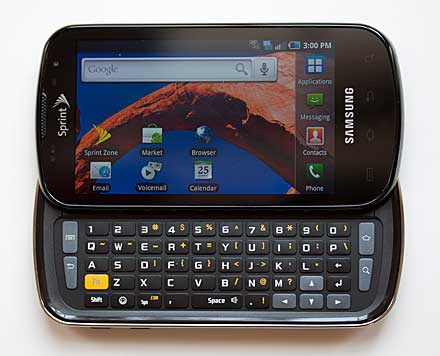
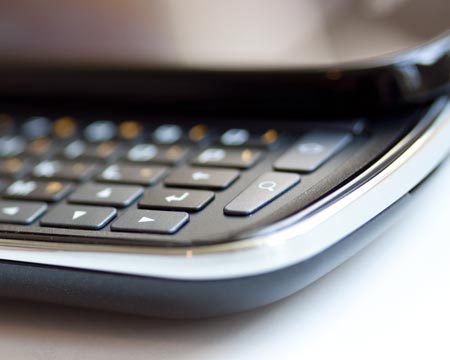
Some of you can't live without keyboards, and that's OK. Samsung's thrilled in fact, since their Epic 4G is the only keyboarded high end Android phone on Sprint. And while all 4 major US carriers offer or will offer a Galaxy S phone, the Epic 4G (aka Galaxy S Pro) is the only version to have a hardware keyboard. Even better, the Epic 4G has a really, really good QWERTY keyboard. It's roomy and it has an embedded arrow pad, a number row and Android function keys for home, menu, search and back. Since the Epic 4G is a large smartphone with a slider that deploys on the long side, the large keyboard works best for those who have large hands. If your idea of keyboard heaven is the BlackBerry Bold 9650 or the Palm Pre, the Epic will seem positively ripe with suburban sprawl.

Samsung Epic 4G

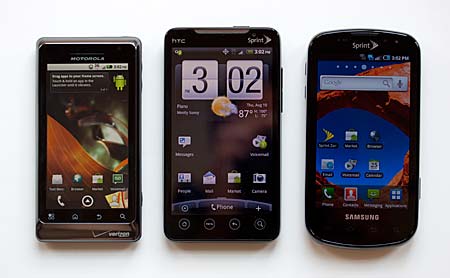
This Android 2.1 smartphone has a 4" Super AMOLED display and the phone is about the same size as Sprint's other 4G Android superphone, the HTC EVO 4G. Though the EVO has a slightly larger 4.3" display, they share the same 800 x 480 resolution. The Epic's slider mechanism and larger bezel surrounds (primarily on the top and bottom) even out the size between EVO and Epic. Like the EVO, this is a Hummer of a phone: hold one in your hand first if you can. Imagine it in your pocket if you're a phone-in-the-pocket kind of person. It makes the iPhone 4 seem petite.

Samsung Epic 4G

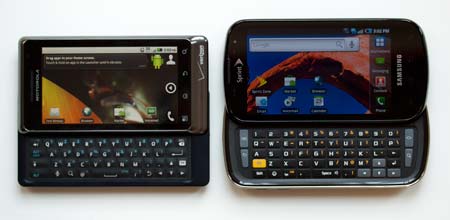
The Motorola Droid 2, HTC EVO 4G and Samsung Epic 4G.

When closed, the Epic looks a little like its keyboard-less cousin the Samsung Vibrant on T-Mobile. It works nicely in the hand as a big slate phone and the on-screen keyboard is quite good, as is Samsung's Swype keyboard input. The phone isn't flashy but it's reasonably attractive and modern looking, particularly the front face. The back is slightly sparkly gray plastic that's fairly grippy and fingerprint-proof but not chic. Given the keyboard slider mechanism, the phone isn't all that thick at 0.6". The slider mechanism is solid with no play and it locks into place at each end of its travel.

Samsung Epic 4G

Battle of the high end Android keyboards: the Motorola Droid 2 and Samsung Epic 4G.
The Epic 4G has the same four front-facing touch sensitive buttons found on other Galaxy S phones. That's not a good thing since these buttons are all but invisible when backlighting is off. Memorize their order and location or tap the screen to turn on backlighting. We noted that the Epic's buttons require a firmer press than the Captivate and Vibrant. That means you won't activate them accidentally but you must linger on them longer when you do want to use them.


 Again, like other Galaxy S phones, we love the sliding cover over the micro USB port, but wish that port wasn't at the top. The location makes it very awkward to talk on the phone while it's charging. Samsung has made one improvement over the other two Galaxy S phones that we love: it has a notification LED!

Samsung Epic 4G


The Epic 4G has a roomy keyboard with raised, discrete keys that we love.


Software
As with the Captivate and Vibrant, the Epic 4G runs Samsung's restrained version of their TouchWiz UI. It's unobtrusive and pleasant. Samsung customizes the icons, giving them backgrounds, organizes the app drawer into pages and provides shortcuts at the bottom of the home screen for the phone dialer, contacts, messaging and applications. The home screen is extended to 7 screens and an indicator at the top tells you which screen you're on (and allows for quick switching). Samsung's social networking software helps integrate Twitter and Facebook with your address book and their widget provides status updates on the home screen. Samsung's Daily Briefing widget has weather, stocks and AP news info (you control the update interval) and Program Monitor helps you manage running applications. And of course, all of Google's usual Android goodies are here including Maps, the Android Market, Gmail, Gtalk, YouTube, Google Voice command and search. Sprint adds Sprint TV, Sprint Navigation, NASCAR and Sprint Football. The phone can act as a high speed wireless modem and WiFi hotspot and Sprint Hotspot is the app for that (this feature requires an additional monthly data fee).
Phone and Data
The Epic is Sprint's second 4G smartphone, thus it has WiMAX 4G. Clear is Sprint's partner for WiMAX, and the coverage area is growing, but it still has a relatively small footprint with several major metro areas left out such as New York City. Nonetheless, you're going to pay $10 extra for data on the Epic 4G, just as you must with the EVO 4G. Here in Dallas, one of the first WiMAX coverage areas, we still have trouble getting a 4G signal indoors because WiMAX uses very high spectrum with poor building penetration. When you do get a good 4G signal, data speeds are a pleasing 3 to 5 megs/sec for downloads-- significantly better than EV-DO Rev. A 3G at 1-2 megs/sec average. When the signal is weak, you'll actually get better data speeds using 3G. Fortunately, you can turn off 4G (as well as the phone's other wireless radios). 4G does eat battery, so we suggest you turn it off when you don't need it. Likewise, if you're not in a 4G coverage area, turn off the radio so it won't hunt for service. The Epic switches seamlessly between 3G and 4G when both radios are on, so you need not manage the handoff yourself.
Voice quality is good on both incoming and outgoing ends, and call volume is average. The speakerphone is loud and full, and it only distorts at 90% volume and above. The phone dialer application is stock Android with tabs for the call log, favorites and contacts. When in a call you can easily transfer sound to and from a Bluetooth headset, mute a call, turn on speakerphone and start a conference call.
The Epic runs Google's excellent Webkit web browser and the Epic 4G's 4" capacitive multi-touch display makes web browsing a wonderful experience (and just as good as the iPhone's). Colors jump out and clarity is very good thanks to Samsung's Super AMOLED display. The display is viewable outdoors and has a wide viewing angle too. The smartphone has Google's YouTube player but no support for desktop-style Flash FLV video (that requires Android OS 2.2 Froyo and Flash 10.1 which should reach the Epic sometime this fall).
The Samsung works with Gmail, POP3/IMAP email and MS Exchange Email. Google Talk is standard for IM and you can download IM clients for other services from the Android Market.

Multimedia and GPS
Samsung has done a good job of improving on Android's rather pedestrian music and video players. The multimedia apps have gotten a facelift and additional features that make the Galaxy S phones more competitive with the iPhone than most other Android mobile phones. The phone can handle 720p video playback easily and with a large storage card you've got plenty of room for music and video files. Sprint TV didn't fare well when we produced our video review a week earlier, but the kinks are now worked out and Sprint TV performs well, even with a middling signal. We received the phone 2 weeks before launch, and it's not unusual for a carrier's multimedia streaming services to not quite be ready.

Video Review
Here's our 10 minute video review of the Samsung Epic 4G. We test out the browser, Sprint TV and TouchWiz 
and compare the phone with other high end Android smartphones.


The 5 megapixel camera with autofocus lens and an LED flash takes sharp photos with pleasing colors. This is the first Galaxy S phone we've seen with a flash in the US, and it's a welcome addition. Low light shots were a lost cause with the Vibrant and Captivate, while they come out decently with the Epic 4G. The phone can shoot up to 720p video and the quality is more than good enough (with good lighting) for YouTube uploads.
The Epic has a front-facing VGA camera; a rarity in US phones but seemingly standard on Sprint 4G smartphones (if 2 phones can be considered a trend).
The GPS has been an issue with the Galaxy S phones and Samsung should shortly release an update to tweak the GPS on the Vibrant and Captivate. Samsung says the problem is largely due to Google's new requirement to ship the phone with location services turned off. If you go into settings and turn on location services, the Galaxy S phones' GPS problems diminish (we have noticed that the setting doesn't always stick). Our Epic 4G's GPS behaved normally and we got a location fix within 6 meters in 30 seconds on a cold start (the phone had just been rebooted). In the week we've used the Epic, the GPS hasn't lost it when running Google Maps and Sprint Navigation. We do have few tall buildings in our area and a generally good view of the sky, however.

Battery Life
Superphones with large displays, WiFi, 3G and 1GHz CPUs aren't Energizer bunnies. 4G only makes it worse, and if you use 4G, the phone will barely make it through a full day. If you stick with 3G, the Epic should make it through a full day. The 1500 mAh Lithium Ion battery is user replaceable, and as with other Galaxy S phones, the battery meter's graphic doesn't match the actual percentage of charge remaining (49% looks like two thirds full according to the menu bar graphic).
Conclusion
Sprint's second 4G Android smartphone is a winner, and we continue to be impressed with Samsung's Galaxy S line. The keyboard is wonderful, the display is dreamy and build quality is solid. Though 4G coverage and speeds aren't sending us into paroxysms of joy, Sprint's 3G EV-DO Rev. A coverage is solid and fast enough to thoroughly enjoy this largely Internet-centric Google phone. And the 1GHz Hummingbird CPU is extremely fast-- there's no lag here. If you're looking for a high end Android smartphone with a QWERTY keyboard, the Epic 4G has few competitors beyond the Motorola Droid 2, and no competitors on Sprint. We have a feeling that even if the Epic faced greater competition, it would still come out at the top or near the top of the superphone heap. Our only complaint? The $10/month additional data plan fee that hurts your pocket more than the $50 higher price vs. competing smartphones.

Specs:
Display: 4", 800 x 480 capacitive multi-touch Super AMOLED display. Has accelerometer and ambient light sensor.
Battery: Lithium Ion rechargeable. Battery is user replaceable. 1500 mAh.
Performance: 1GHz Samsung Hummingbird CPU, ARM Cortex-A8 with PowerVR 3D accelerated graphics. 1 gig internal storage.
Size: 4.9 x 2.5 x 0.6 inches. Weight: 5.47 ounces.
Phone: CDMA dual band digital with EV-DO Rev. A 3G. 4G WiMAX.
Camera: Main (rear-facing) 5.0 megapixel with autofocus lens and LED flash. Can shoot HD 720p video. Has front-facing VGA camera.
Audio: Built in speaker, mic and 3.5mm standard stereo headphone jack. Google Voice Command software, Samsung customized music player and video player. Has virtual Dolby 5.1 sound.
Networking: Integrated WiFi 802.11b/g and Bluetooth 2.1.
Software: Android OS 2.1 Eclair with Samsung TouchWiz 3.0 and the full suite of Google apps. Sprint apps include Sprint Navigation, Sprint TV and Sprint Football.
Expansion: SDHC microSD card slot, 16 gig included.
In the Box: Phone, battery, charger, USB cable, 16 microSD card (installed in phone), microSD card adapter, stereo earbud headset and printed guide.