Sabtu, 29 Januari 2011

Samsung Galaxy Tab


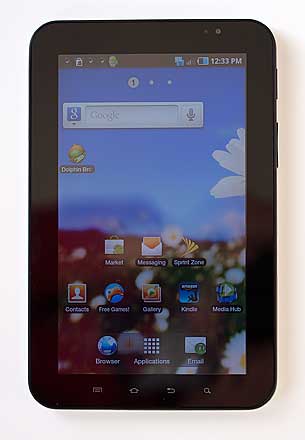
The Samsung Galaxy Tab is one of the hottest pieces of technology in 2010. It's the first high quality Android tablet with a fast CPU, capacitive display, Android OS 2.2 Froyo, 3G and all the trimmings. The Tab's 7", 1024 x 600 display runs at an even higher resolution than Samsung's Android superphones in the Galaxy S family, and that means you'll see more of documents, web pages and ebooks without scrolling. That said, beyond the increased resolution and display size, the Tab is basically an oversized Galaxy S smartphone minus the cellular calling feature in US versions. That's a good thing and a bad thing: the increased screen real estate really transforms the Galaxy Tab into something that, like the iPad, can stand in for a computer when doing tasks like web browsing, email and reading. That said, it doesn't really do anything your Samsung Fascinate, Vibrant or Captivate can't do (at least not yet). The same can largely be said of the iPad vs. iPhone 4, but that hasn't hurt sales. There are a decent selection of HD optimized iPad apps though, while there are virtually none outside of Samsung's own, for the Tab. Will we see more Android tablet applications that turn the Galaxy Tab and other brands into a killer gadget? It's hard to say; so far there hasn't been a lot of action in the tablet-optimized app arena, but it is a young and fragmented space. Since the Galaxy Tab is selling well in its first month on the market, developers will likely take an interest in supporting the super-sized display.
Samsung Galaxy Tab
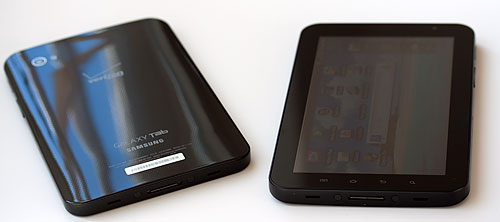
The Tab is available on all of the big 4 US carriers, and we have the AT&T, T-Mobile, Verizon and Sprint versions in-house for this review. All 4 models have the same specs, hardware (other than CDMA vs. GSM radios and Sprint/Verizon having 2 gigs internal storage plus a 16 gig microSD card and T-Mobile/AT&T having 16 gigs of internal storage with no bundled microSD card) and look the same (Sprint's has a gloss white back while the others are gloss black). The Tab is a good looking piece of electronics, and it goes with the same glossy plastic and attractive angles as the Galaxy S phones. If you hate plastic, sorry but Samsung isn't going to change their design esthetic any time soon.
The Galaxy Tab runs Android OS 2.2 Froyo with Samsung's TouchWiz 3.0 UI. If you've used any of the Galaxy S phones, you'll feel right at home because the user interface is identical. Samsung has customized the calendar and contacts applications to make much better use of the higher resolution display (check it out in our video review below). As with the Galaxy S phones, the music player and video player have been much improved from their vanilla Android versions and the Tab supports additional video formats including DivX.
Samsung Galaxy Tab
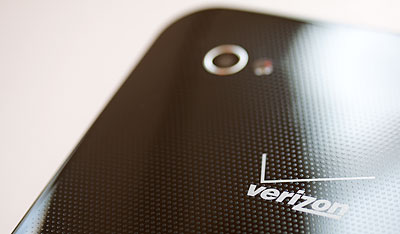
The Verizon version has a dot pattern that's visible in good light.

The Tab runs on the same 1GHz Hummingbird ARM Cortex-A8 family CPU as the Galaxy S phones, and it has a hardware GPU and 512 megs of RAM. The Tab is responsive on all 4 carriers and it handles video playback well. The 7" capacitive multi-touch display is sharp, extremely bright and colorful, though it's not Super AMOLED (Super AMOLED isn't yet available in displays this large). The Tab has WiFi 802.11b/g/n, a GPS that works with Google Maps and Navigation and Bluetooth, though headset and handsfree profiles are missing.
The Tab has the same lightly masked capacitive front buttons for menu, home, back and search. The 3.5mm stereo jack is up top, and the proprietary 30 pin dock port is at the bottom. Samsung went with the special connector because, like the iPad and Dell Streak, the Tab can do more than sync and charge via the port (e.g.: HDMI out, TV out and keyboard). 

Comparing the 4 Samsung Galaxy Tab Models
Pricing varies by carrier as do plans and contract requirements, so we'll try to sum things up.
- Both Sprint and T-Mobile offer the Tab with a 2 year contract for $399 (requires a data contract), and $599 if you buy it without a contract. Sprint charges $29.99 for 2 gigs data and $59.99 for 5 gigs of data per month. T-Mobile charges $24.99 for 200 megs and $39.99 for 5 gigs of data per month.
- Verizon and AT&T sell it only without contract, though the device is locked to the respective carrier.
- Verizon sells the Tab for the same $599 retail price as do Sprint and T-Mobile while AT&T charges $649. AT&T does throw in a $50 Media Hub credit for the $50 price hike, and their data plans are a bit more affordable-- they're the same $14.99 for 250MB and $25 for 2 gigs plans offered with the iPad. Verizon has data plans that are priced at 1 gig for $20 and 3 gigs for $35 as well as their iPad + MiFi 5 gigs for $50 and 10 gigs for $80 plans. Though the Verizon plans are no-contract, Verizon will charge activation fees if you stop using their data service for a month or two, then start it back up.
Samsung Galaxy Tab
The short story: Sprint charges the most for data and AT&T charges the most for the hardware. T-Mobile's 200 megs for $24.99 is absurdly overpriced but their 5 gig plan pricing is very good considering WiFi tethering is included. All carriers offer 5 gig plans (Verizon goes even higher) except AT&T where you're limited to 2 gigs/month (though that's more than enough for most folks). Sprint, T-Mobile and Verizon's Tab can act as a 3G to WiFi hotspot to share the 3G connection with laptops and other devices. AT&T's version doesn't have this feature, though the 2 gig cap would be problematic for heavy tether users. Verizon offers the highest package at 10 gigs for you crazy-heavy users (T-Mobile doesn't charge overages so you could go to 10 gigs but they throttle you back to EDGE if you exceed your monthly allowance).
3G reception is solid on all 4 models. There's plenty of room for an antenna and lots of power for the cellular radio thanks to the 4,000 mAh Lithium Ion battery.
AT&T, as always, blocks installation of non-market apps. That means you can only install apps from the Android Market on the device (or hack your AT&T Tab to install non-market apps).
Herein the problem begins and ends: the various options are enough to keep you busy with a calculator for a long while, and the Galaxy Tab is expensive, no matter how you slice it. That hurts in a recession. You can get a netbook for lots less, but then everyone's been there and done that with netbooks, and tablets are the new hot tech. And the Galaxy Tab is a very nice piece of hardware with Android's strong appeal, even if Android isn't particularly optimized for tablets.Samsung Galaxy Tab
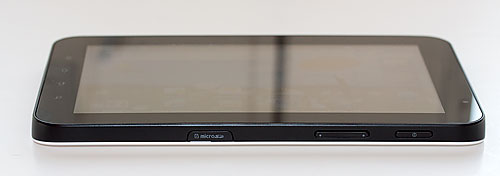
The microSD card slot and mechanical volume and power controls are on the right side.

Video Review
Here's our 15 minute video review and demo of the Samsung Galaxy Tab:

Android as a Tablet
I confess that I wasn't the least bit annoyed at the lack of tablet-oriented features in Android OS 2.2 Froyo (the most recent OS version available from Google at press time). Everything works just fine, thank you, and I found most 3rd party apps scaled to fill the screen without looking grainy or blocky. Yes, Angry Birds runs full screen and works well. Since Android superphones run at 800 x 480, it's not that much of a stretch to 1024 x 600 resolution (the standard netbook resolution, FYI). For a 10" tablet with even higher resolution, I'd want to see more tablet-aware applications, but at 7" the Tab doesn't beg for specialized applications.
What I don't like about Samsung's customization of Android on the Galaxy Tab, much like what they did with some Galaxy S phone models, is they've hardwired the web browser to identify as a mobile browser. There's no stable way to override this, and it's done at the system level. That means if you install a 3rd party web browser like Dolphin HD, you'll still see the mobile versions of sites like the New York Times, even if you change Dolphin's setting to identify as a desktop browser rather than Android. We applaud Verizon: they're the only US carrier with the Tab that identifies as a desktop when using the built-in web browser (and 3rd party browsers can work in desktop mode too). Heck, if my 5" Dell Streak defaults to desktop browsing mode, why shouldn't an even higher resolution 7" tablet with Flash? It's positively silly.
Carrier Customizations
None of the Tabs are terribly bloated, and though you may be shocked, the AT&T version is very clean. No Mobile Banking, no YP Mobile, not even AT&T Navigator is on board. There are just utilities to find AT&T Hotspots and an account management application.
Sprint adds Sprint Hotspot, Sprint Zone, Qik video chat and a Free Games app that links to Gameloft's page of demo Android games (err, these aren't exactly free games, they're demos and games for sale).
T-Mobile adds a 3G Hotspot app, Slacker Radio, Qik video chat, Kindle, a demo version of the Asphalt 5 racing game (it looks great and plays well), T-Mobile My Account and Startup (gets you going with a data package if you don't already have one).
Verizon adds 3G Hotspot, VZ Navigator, Backup Assistant, Blockbuster, Kindle, Let's Golf (demo Gameloft game), My Verizon Mobile, Slacker Radio, N.O.V.A. (another demo Gameloft game), V Cast Apps, V Cast Music and V Cast Song ID. Yep, Verizon adds the most apps among US Galaxy Tab carriers.
Standard Software
All Galaxy Tab models have the staples of Android 2.2 goodness: the Webkit web browser, Gmail, email (POP3, IMAP and MS Exchange), YouTube, the Android Market, Messaging (you can SMS and MMS using the Tab except the AT&T version), Flash Player 10.1 (full Flash, take that iPad), Gtalk, Google Maps with navigation and Places, Voice Search, Contacts, Calendar and News & Weather.
Samsung adds their customizations to the Google PIM apps, a file manager, Memo, Daily Briefing, ThinkFree Office (view and edit MS Office documents and view PDFs, Task Manager and Samsung Media Hub where you can buy and rent movies and TV shows for viewing on the Tab and other authorized devices.

As an eReader
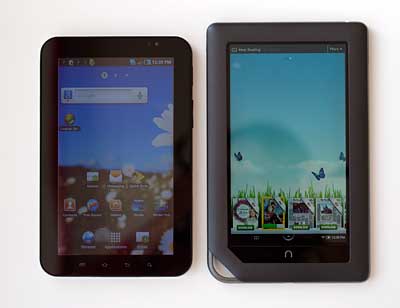
Personally, if my chief use of the device was reading ebooks and PDFs, I'd go with Barnes & Noble's excellent and much more affordable Nook Color. It's optimized for reading applications, has a warmer display that's a bit more soothing to the eyes, it has less screen glare and more granular brightness adjustments. The Nook Color requires no contract; it has WiFi but no 3G. However, the Nook Color, though it runs Android and shares the same 1024 x 600 capacitive display, is no full-service Android tablet (unless you root it, or hack it for those who don't know what root means).
Samsung Galaxy Tab
The Samsung Galaxy Tab and Barnes & Noble Nook Color.
If you want a full-duty tablet with the Android Market and the full power of Android and aren't into rooting your device, the Galaxy Tab is the better choice. Likewise, if you're an Amazon Kindle person and have a large library of books with Amazon, the Nook Color won't cut it for you since it doesn't have a Kindle app (duh, B&N doesn't want you shopping with Amazon). The Nook Color is compatible with B&N Books, Sony Reader books, Borders Books, Kobo books and public library books; it's just Kindle books that are off limits.
As an In-Car Navigation System
The Galaxy Tab's GPS worked very well on all US carrier versions. We had no problem with location accuracy or fix times, and the large display is wonderful for in- car navigation. The bigger challenge is finding a mount or suitable place for a 13.5 ounce, 7.5" x 4.76" device on your dash or center console. The Tab has adequate volume to combat loud road noise, but the gloss display can be difficult to see in shafts of direct sunlight. If you're using Google's applications, you'll need 3G data to download maps and navigation data real time.
All 4 versions come with Google Maps, Google Navigation and Places. Only Verizon includes their pay-for solution, VZ Navigator as an additional option (no TeleNav on the other models as of this writing).
The Samsung Galaxy Tab vs. Other Android Tablets
The Galaxy Tab sits at the top of the heap in terms of features, quality and price. There are cheaper tablets like the Huawei S7 but they have grainy resistive displays (not capacitive multi-touch), or slower CPUs and fewer features. Most inexpensive tablets without 3G lack access to the Android Market (Cruz Tablet, Archos 7) since Google requires a cellular radio among other things to qualify for the Android Market. If you're on a serious budget and just want to play around with an Android tablet, the Galaxy Tab is a stretch. But if you're got the money and want the best money currently can buy, the Tab is it.

The Samsung Galaxy Tab vs. the iPad
Android vs. iOS verges on a religious war. Suffice to say that platform preference is your business and both are vibrant and enjoyable. If you really are a blank slate, then the real considerations are screen size vs. portability, Flash Player and gaming.
The iPad has a much larger 9.7" display, though its resolution isn't hugely higher than the Tab's. The large display is particularly enjoyable when watching movies and viewing desktop-oriented web sites.
The downside is that the iPad is quite large and heavy-- it's twice the size and nearly twice the weight of the Tab. If you want something you can easily stow in your gear bag, the Galaxy Tab is the more portable choice. It's also easier to hold without cramping hand and arm muscles when reading ebooks for an hour or 3.
Want Flash Player in your web browser? Not gonna happen on the iPad, according to the seemingly bitter Steve Jobs. The Galaxy Tab has Flash Player and performance is decent.
Are you into gaming? So far Apple's iOS platform has a vast lead. Android gaming, especially 3D gaming and tier 1 titles? Not so much.
Want a contract discount on that pricey hardware? The Galaxy Tab on T-Mobile and Sprint are there to tempt you with less up-front spend. Of course, it's the gift that will keep on costing for 2 years. Apple's iPad? No contract and no discounts, just like the AT&T and Verizon versions of the Tab.
Battery Life
The Galaxy Tab has a 4,000 mAh battery that's sealed inside the unit (and it's not easy cracking open the Tab on your own). That's a lot of capacity and the Tabs on all carriers surprised us with their stamina. With moderate use, I charged every 2-3 days. That's much better battery life than we get with Samsung's Galaxy S Android Smartphones, but the phones have much smaller batteries.
Samsung includes a gloss black (of course) wall charger and a USB to 30 pin connector cable in the box.
Conclusion
The Samsung Galaxy Tab is one sexy gadget. To play with it is to want it. That said, it's not cheap, and the Sprint and T-Mobile versions add yet another contract to your life. Is the Tab worth it? If you want the best Android tablet on the market, then it is.
The display is excellent, speed is very good and 3G anywhere means the Tab can be your road warrior go-to gadget for the web, email, social networking and light MS Office work (the on-screen keyboard is quite good but I wouldn't want to write the next American novel on it or even on the iPad). If your Samsung Vibrant, Captivate, Fascinate or other big-screen Android phones do it all for you, but you find their 4" displays too small for long bouts of use, the Tab could rock your world.
Apple's iPad or Samsung Galaxy Tab? They're both great devices with solid ecosystems behind them, but I'd choose the Tab since it fits in a bag or huge pocket and I can go with any major US carrier. That said, I don't play a lot of games nor do I have a large library of iTunes video that would tie me to iOS.
Price: Varies, $399 with contract if available, $599 to $649 retail with no contract.

Specs:
Display: 7" capacitive multi-touch display. Resolution: 1024 x 600, supports both portrait and landscape modes via accelerometer. Has ambient light sensor, compass and gyroscopic sensor.
Battery: Lithium Ion rechargeable. Battery is not replaceable. 4000 mAh.
Performance: Samsung Hummingbird (ARM Cortex-A8 family) 1GHz CPU with hardware graphics acceleration. 512 megs RAM. 2 gigs internal storage on Verizon and Sprint versions. 16 gigs internal storage on the AT&T and T-Mobile versions.
GPS: Has GPS and comes with Google Maps and Navigation. The Verizon version works with VZ Navigator as well.
Size: 7.48 x 4.76 x 0.47 inches. Weight: 13.5 ounces.
Phone: AT&T: GSM quad band with 3G HSDPA on the 850/1900/2100MHz bands. T-Mobile: quad band GSM with 3G on the 1700/2100MHz bands. Sprint and Verizon: CDMA dual band digital with 3G EV-DO Rev. A.
Camera: Rear (main) 3.0 MP autofocus camera with LED flash. Front-facing 1.3MP video conferencing camera.
Audio and Video: Built in speaker, mic and 3.5mm standard stereo headphone jack. Enhanced music player, video player that supports DivX, XviD, MPEG4, H.263 and H.264 formats, YouTube and Gallery applications for music and video. All come with Samsung's Media Hub application where you can rent and buy movies and TV shows for a fee.
Networking: Integrated WiFi 802.11b/g/n and Bluetooth3.0 (has A2DP but no headset or handsfree profiles).
Software: Android OS 2.2 Froyo with Samsung TouchWiz 3.0 UI. Flash Player 10.1, Samsung's Galaxy platform Android software (Daily Briefing, social networking, Digital Frame, AllShare DLNA, Media Hub and more). ThinkFree Office MS Office viewer/editor suite included (also views PDFs).
Expansion: 1 SDHC microSD card slot. A 16 gig card is included with the Verizon and Sprint version since they have 2 gigs internal memory vs. 16 gigs internal memory on the AT&T and T-Mobile versions. 

Dell Streak


Confession: I really love the Dell Streak. I picked one up at Best Buy to see what was up with one of the few pocketable Android tablets that boasted high quality materials and the ability to make phone calls. I didn't expect much, but as it turns out the Dell Streak has elegant hardware, thoughtful software customizations that make good use of the added screen real estate and excellent reception. Sure, a 5" tablet isn't for those whose primary use for a smartphone is voice calls; you can hold it to your head for calls but it is large. Perhaps not all that large: I took it on a business trip and used it in public places and airports and not one person stared at me.
Dell Streak
The Streak costs $100 more than a high end smartphone with contract (and is priced similarly if you go sans contract), and you literally get more for your money. The Streak has a 5" capacitive multi-touch display (though multi-touch isn't implemented everywhere since our device runs Android 1.6), a 1GHz Snapdragon CPU, a 5 megapixel rear camera and a front-facing video conferencing camera, WiFi 802.11b/g/n, Bluetooth 2.1 and a GPS. In the US it's currently sold locked to AT&T and Best Buy has the exclusive for now. Dell will release an unlocked version in the US in the coming months and it will come pre-loaded with Froyo (Android OS 2.2) and Dell's Stage UI which can be disabled if you don't like it, though it looks very slick. The Streak is $299 with an AT&T contract and $549 without contract.
Dell Streak
The hardware is simply top notch with an elegant design, large glass front, tapering edges and a metal back. In terms of materials, the Streak makes the Samsung Galaxy Tab look like a hunk of plastic. Despite its larger than phone size, the Streak isn't unbearably heavy at 7.7 ounces and the straight top and bottom edges plus coated metal back make it easy to hold securely. The capacitive buttons are backlit and are one short of the usual Android 4: there's a back button, menu button and search button but no home button. Dell has mildly customized the UI to put a ubiquitous home button at the top of the menu bar, so there's no need for a dedicated button. The only thing we don't like about the hardware? The back cover fits on very tightly and it's hard to get on and off until you've broken it in. What's the big deal? If the cover isn't fully locked in place, the Streak won't turn on. For some reason Dell put switches under the back cover that kill power if it's not in place.
Dell Streak
The display is 800 x 480 resolution and has an accelerometer that supports portrait and landscape modes most everywhere except the home screen. The capacitive display is extremely sharp and has good colors-- this is one of the best non-AMOLED displays on the market. It's made of Gorilla glass, so it's harder to scratch too. Given the extra 1" vs. phones like the Captivate, text is easier to read without zooming and it feels like a mini-computer rather than a phone when browsing and working with email and MS Office documents.

Yes, it's a phone too
The Streak is a quad band GSM phone with 3G HSDPA 7.2Mbps on AT&T's 3G bands as well as 2100MHz for use abroad. Currently, the Streak is sold locked to AT&T, even if you buy it from Dell.com in the US without a contract. The Dell has an earpiece and mic, so you can hold it to your head as you would any (err, large) smartphone. You can also use the included stereo earbud headset or a Bluetooth headset. Call quality through the earpiece is average and is very good via wired and Bluetooth headsets. Reception is stellar-- the Streak is one of the stronger RF phones on the market for AT&T. We got more bars in more places vs. the Samsung Captivate, iPhone 4 and Motorola Backflip. Only the BlackBerry Torch could hold a candle to the Streak in terms of reception.
When it comes to all things data, the Streak excels thanks to its larger display, excellent Android web browser with pinch zoom (Dell tweaked Android 1.6 to add pinch zooming), Gmail client, strong email client and bundled trial of TouchDown for MS Exchange sync via Exchange Activesync. The Streak's browser identifies itself as a desktop browser, so you're not stuck looking at mobile versions of websites on that large, high resolution display. Score one for Dell vs. Samsung whose Galaxy Tab identifies itself as a mobile browser (no fancy HTML5 New York Times web page with videos for you, Tab).
Video Review
Here's our video review of the Dell Streak:

Multimedia, Software and Performance
The Dell runs on the Qualcomm Snapdragon QSD8250 CPU clocked at 1GHz with companion GPU. It has 512 megs of RAM (ample for Android) and 512 megs of user accessible flash storage plus 2 gigs non-accessible flash memory where the OS and built-in apps are stored. The Streak ships with a 16 gig microSD card in the slot under the battery door. Despite running an older version of Android rather than the super-speedy 2.2 OS, the Streak is a responsive Android tablet, and it should certainly fly with 2.2. The 668 benchmark score using Quadrant was just OK but not stellar thanks to the older OS version. We expect to see a several hundred point improvement with Froyo. 3D games like Reckless Racing run smoothly on the Streak.
Dell Streak
Dell customized Android in some cases to make up for deficiencies in OS 1.6 (writing a driver to support pinch-zooming in some apps, bundling a trial of Touchdown for MS Exchange sync), and in others to enhance the big-screen user experience. The dialer is a two pane affair with both a number pad and contacts listing, and contacts are enhanced with shortcuts to email, SMS, call and more. Instead of a hardware home button we have a ubiquitous apps link in the menu bar and a two stage applications listing (a pre-defined quick pick list of commonly used apps followed by all apps). Tapping on the notification area provides notification and battery info. All in all, we like Dell's tweaks that don't add unnecessary eye candy and instead add features and organizational tools. The upcoming Froyo 2.2 upgrade will introduce Dell's slick Stage UI used on their touch screen all-in-one PCs. If you don't like the Stage UI, you can disable it and go with a standard Android experience.
A 5" tablet format phone begs to be your portable video player, and the Streak didn't disappoint. It handles YouTube HQ using Google's player just fine (sorry, there's no full Flash until Froyo) and locally stored videos ripped to suit the display's resolution played well. The speaker is very loud and clear. You can use the included stereo earbud headset as well.
GPS and Battery Life
The Dell Streak has a GPS and compass, and both were very accurate in our tests. The compass worked so well that we used it for walking directions without fail. The tablet ships with Google Maps, Navigation and Places and Navigation includes spoken turn by turn driving directions. Thanks to the large display and loud, clear speaker, the Streak is a wonderful stand-in for a dedicated in-car GPS. Google's directions are solid these days, and the robotic female voice is certainly artificial but easy to understand. We particularly like the way Navigation handles arrivals: once you're within 30 feet or so of your destination, Navigation tells you that you've arrived and switches to a street view of your destination to help you identify it.
The Streak is an Energizer bunny thanks to excellent CPU optimizations and the 1530 mAh battery. Generally a device with a 5" display and 1GHz CPU doesn't have good battery life, but the Streak easily outlasted our Samsung Captivate and other high end Android smartphones. In a typical day that involved an hour of calls, working with email throughout the day, using the web browser for an hour and playing a few YouTube videos, the Dell easily lasted us a day.
Conclusion
It's hard not to love the Dell Streak unless you prefer smaller, voice-centric smartphones. It's not only a voice phone but a tablet with a 5" display that makes for a better Internet and multimedia experience than 4" and even 4.3" Android smartphones. Unlike the Samsung Galaxy Tab, it's pocketable, you can hold it to your head and make calls and you can use it as a phone (US Galaxy Tabs don't do cellular calls). This versatile tablet is gorgeous looking and speaks of quality. The battery door is fussy until broken in (get it completely in place or the device won't power on, or will power off if the door dislodges) though. If you need a pocket computer and Internet device first and a phone second, the Streak is enticing at $299 with contract. We can't wait to see what Froyo brings!

Price: $299 with a 2 year contract, $549 with no contract

Specs:
Display: 5" capacitive multi-touch LCD. Supports both portrait and landscape modes via accelerometer. Resolution: 800 x 480. Has an ambient light sensor, proximity sensor.
Battery: Lithium Ion rechargeable. Battery is user replaceable. 1530 mAh.
Performance: 1GHz Qualcomm Snapdragon QSD8250 processor. 512 MB built-in RAM. 512 MB Flash ROM plus 2 gig non-user accessible partition. 16 gig microSD card included.
Size: 6 x 3.1 x 0.4 inches. Weight: 7.7 ounces.
Phone: Quad band GSM world phone 850/900/1800/1900MHz bands. 3G HSDPA 7.2Mbps on the 850/1900/2100MHz bands for use with AT&T and overseas.
GPS: GPS with compass that works with Google Maps, Google Navigation and other location-based apps. AT&T Navigator is not included.
Camera: 5 MP main rear autofocus camera with dual LED flash. Front-facing video conferencing camera.
Audio: Built in speaker, mic and 3.5mm standard stereo headphone jack. Voice Command software included.
Networking: Integrated WiFi 802.11b/g and Bluetooth 2.0 +EDR.
Software: Android OS 1.6 with Dell software customizations. Froyo Android OS 2.2 should be available by early December 2010.
Expansion: 1 SDHC microSD card slot under back cover, 16 gig card included. 

Nexus S


A Closer Look at the Google Nexus S by Samsung
If you're coming from a Samsung Vibrant or Captivate, you'll notice a few things have been tweaked. The micro USB port is finally at the bottom where it belongs, and there's no tiny sliding cover over that port. At first I loved that little sliding cover, but after using the Vibrant and Captivate for several months, I found I never remembered to slide it closed anyhow. The headphone jack is at the bottom rather than top on the Nexus S (I'm neutral on that one) and the phone is a wee bit thicker and less tapered on the sides vs. the Vibrant. That's a wonderful thing because the Vibrant, much like the iPhone 3GS and iPod Touch, is too thin to easily pull out of a pocket or bag and next to impossible to hold onto. The Nexus S feels much better in hand. The exaggerated (compared to the Vibrant) rear chin also makes it easier to grip the phone and feels good in hand. That chin also creates an overall level rear cover that prevents wobble when laying on a desk.
The phone is unabashedly gloss black plastic-- something that Samsung and perhaps folks in the Far East love much more than Americans. I have nothing against the look other than the fact it gets embarrassingly grimy looking. The phone does not look cheap. In fact, the updated lines and blacked out look are downright sexy and classy. But I do miss HTC's metal and professional look in the Nexus One. Those plastics mean the Galaxy S weighs less than the Nexus One even though it's a little bit larger. It feels solid enough in hand, and it's no more delicate than the Vibrant and overseas Galaxy S sold in Europe and Asia. As with other Samsung high end Android and Bada OS phones, the back cover has a subtle pattern that's visible when you move the phone back and forth in the light. This is not a tactile pattern, it's purely eye candy.
Nexus S
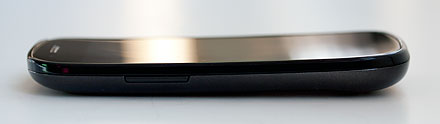
The power and volume controls are in the same locations as the Galaxy S (near the top on the right and left sides), and that means they're too easy to squeeze when pulling the phone out of a pocket or purse. It's also hard to avoid hitting the top volume control when pressing the power/wake button. The touch sensitive front Android buttons are the usual faintly masked ones that are much easier to see when their backlighting is on. The button order is different from the Galaxy S phones... so much for muscle memory. They are the usual Android buttons for back, menu, search and home. Alas, there's no dedicated camera button, and that means you need a steady hand when tapping the on-screen focus/shutter button.
The display is as beautiful and vivid as ever. Nothing beats Samsung's super-sized 4" Super AMOLED display for brightness, color saturation and outdoor visibility. Though the respectable 235ppi pixel density is lower than Apple's iPhone 4 Retina Display, I have no complaints about text clarity and image sharpness. The touch screen supports multi-touch pinch zooming and is very responsive.
Performance is top notch. Froyo's claim to fame was significantly improved speed, and Gingerbread takes it a bit farther. The Nexus S is a very fast phone and it flies through high quality MPEG4 video playback, YouTube streaming in HQ over 3G and WiFi and it handles native Flash better than many other Flash-capable Android handsets. From the benchmarks below we see that the Nexus S is one of the faster Android smartphones on the market according to Quadrant whose tests include 3D trials. Softweg does 2D graphics only, and the Nexus S scores well overall there too. It will be interesting to see how the Nexus S does when rooted and overclocked (the Hummingbird can be a bit sensitive to overclocking) and with custom ROMs.
Benchmarks:
Softweg benchmark:
Graphics: 31.7
CPU: 1680
Memory: 679.7
File system: 271.65
Quadrant: 1648            

Video Review
Here's our video review of the Google Nexus S:


Phone and Data
The Nexus S has excellent call quality and solid reception. While the db sometimes reads higher on our Vibrant for reception, the Nexus S never dropped down to EDGE during a call unlike the Vibrant and T-Mobile G2. The Vibrant, like all Galaxy S phones, has good voice quality, but the Nexus S beats it with extremely clear incoming and outgoing audio with good volume. Bluetooth behaved well, and again I thought the Vibrant sounded quite good with my BMW Bluetooth, but the Nexus S took it up a notch with even louder, more full and natural audio over the car's speaker system. Call recipients said we sounded close to landline good with adequate noise reduction.
The Nexus S is a quad band GSM world phone with EDGE and it's sold unlocked for use with any GSM carrier (T-Mobile and AT&T in the US). The Nexus works best with T-Mobile in the US, since it has their 3G bands. It also has overseas 3G on the 900/2100MHz bands, making it a capable world traveler. We recommend the Nexus S if you're a T-Mobile US customer: not only can you get contract pricing, but you get 3G. On AT&T you'll get EDGE and Google phones aren't much fun on EDGE since they're data-centric. If you're a Sprint or Verizon customer, you're out of luck since those carriers use CDMA rather than GSM networks.
GPS and Camera
Samsung's issues with the Vibrant and Captivate GPS mean that we have to test the heck out of their Android phones. So far, the Nexus S' GPS has behaved well. Cold fixes (just after a reboot when indoors) are slower than average at 8-10 seconds but once the device gets a fix, it holds onto it and positions us accurately. We'll keep testing this over the coming weeks since the Galaxy S' GPS issues didn't always show up immediately. The phone works with Google Maps, Navigation and other location-based services and it has a digital compass that's handy for walking directions. Google Maps, now up to version 5, has come a long way quickly and directions are generally spot-on and in some cases better than the gold standard, TeleNav. Google Maps, unlike TeleNav and VZ Navigator, now knows about multiple entrances to large venues and big box stores, and that means it no longer tells you to circle around the block until you reach the sanctioned entrance. 3D moving maps with illustrated landmarks are new for version 5 and we find the 3D view much easier to follow when driving.
The Nexus S has a loud and clear speaker, much like the Galaxy S phones. We had no trouble hearing it in the car, and it's downright loud indoors.
The 5 megapixel camera takes very good shots with strong, generally accurate colors, plenty of detail and sharpness that's pleasing without looking overdone. Samsung's higher end phones tend to have good cameras and the Nexus S certainly takes as good photos as do Samsung Galaxy S phones, if not better. Image quality is far superior to that of the Nexus One. Our only complaint is the lack of a hardware shutter button since it's hard to hold the phone still when poking the on-screen capture button.
sample photo
Sample 5MP photo. Click on the image to see a larger version.
There are plenty of settings to tweak captured photos, and a simple slider to switch to video recording mode. The Nexus S is limited to 720 x 480 pixel video, but video quality is quite good. We do wonder why the Vibrant gets 720p video while the Nexus doesn't.
The front-facing camera is a plus for those of you who want to video-chat. The camera application can control either camera, but there's no built-in software for video chatting. We downloaded Tango and at first it worked with the front camera, but after the first 2 uses, we couldn't get it to use the front camera again (the rear one works well). We downloaded Qik via the T-Mobile tab in the Android Market, but it crashed when we tried to do 2-way video calling. Clearly, it will take some time to get the Nexus S up and running with video calling, and the newly added SIP support in Gingerbread may be part of the problem. And speaking of the T-Mobile tab in the Android Market, you only see it if you're using a T-Mobile SIM.
Battery Life
Battery life is the big hurt for the Vibrant, and mine lasts only a day with moderate to not quite heavy use. The Nexus S in contrast, has been hard to kill. We'll continue to test battery life over the coming weeks, but so far the Nexus S has no trouble lasting through a day with heavy use that includes calls, push email, Twitter updates, newsfeed updates and the usual Google data syncing. The 1500 mAh Lithium Ion battery is the same capacity as the Vibrant's, but it's a different physical design so they're not interchangeable.

Conclusion
The Samsung Nexus S Google phone isn't for everyone. Here in the US it's a solid choice on T-Mobile, but I'd pass for use on AT&T since it lacks AT&T's 3G bands. We expect support and hardware exchanges to be much smoother vs. the Nexus One since Best Buy and Samsung are backing the phone, while the Nexus had virtually no customer service support from Google, little support from HTC and no retailer to act as middleman.
The hardware is top notch even if not groundbreaking, and the phone's biggest selling points are getting Android OS 2.3 Gingerbread early, and the pure Google Android experience. The phone is very fast, stable and is a clean slate with no added manufacturer or carrier bloatware. We're big on losing the bloat and problems it can cause, though admittedly, Google's media players are weak and could use a little Samsung love.
If you're looking for the latest in Android, want a clean experience and more timely OS and application updates, the Samsung Nexus S is your best bet. Should you replace your Vibrant on T-Mobile? I've done so for the new OS (nearly a requirement for my job as a reviewer), and cleaner and more stable software. The Nexus S just works, and that's a good thing after living with the Galaxy S' various quirks. Is it a groundbreaking device as the Nexus One was in its day? No.

Price: $199 with a T-Mobile US contract, $529 without contract


Specs:
Display: 4", 800 x 480 capacitive multi-touch Super AMOLED display (curved Contour display) with 235ppi pixel density. Has accelerometer, proximity sensor and ambient light sensor. Has haptic feedback and 3-axis gyroscope.
Battery: Lithium Ion rechargeable. Battery is user replaceable. 1500 mAh. Claimed 3G talk time: 6.7 hours. Claimed standby: up to 17.8 days.
Performance: 1GHz Hummingbird CPU (ARM Cortex-A8) with POWERVR graphics. 512 megs RAM and 16 gigs iNAND flash storage with approx. 13.5 gigs available.
Size: 4.87 x 2.48 x 0.43 inches. Weight: 4.55 ounces.
Phone: GSM quad band world phone with EDGE 850/900/1800/1900MHz. 3G HSDPA 7.2Mbps/HSUPA on the 900/1700/2100MHz bands (compatible with T-Mobile US and overseas). Has Google's WiFi Hotspot feature for sharing 3D connection over WiFi with laptops and other devices.
GPS: Has GPS with aGPS and digital compass.
Camera: Main (rear) 5.0 megapixel with autofocus lens and LED flash. Can shoot HD 720 x 480 video. Front camera: VGA camera for video conferencing etcetera.
Audio: Built in speaker, mic and 3.5mm standard stereo headphone jack.
Networking: Integrated WiFi 802.11b/g/n and Bluetooth 2.1 +EDR.
Software: Android OS 2.3 Gingerbread. Standard Google apps including the Android Market, Google Maps with Navigation, Google Earth, Google Talk, Google Search, Google Voice, Google Talk, Gmail, Email, Voice Actions and YouTube player.
Expansion: None.
NFC: Yes.
In the Box: Phone, battery, USB cable, world charger and stereo earbud headset.

Motorola Cliq 2

The original Motorola Cliq was a distinctly mid-range Android smartphone whose low resolution display was overwhelmed by Motoblur widgets. The new Cliq 2 verges on high end smartphone territory and has become one of our favorite Android smartphones in its price bracket of $99 with contract. The Cliq 2 has a 1GHz Texas Instruments CPU, an 854 x 480 pixel capacitive multi-touch display, a 5 megapixel autofocus camera with dual LED flash and Android OS 2.2 Froyo. The Cliq 2 is different enough from the first gen model that T-Mobile and Motorola really should have gone with a fresh name.
Motorola Cliq 2
In terms of looks, the Cliq 2 bears some similarity to the original Cliq, but it looks like a more high quality version of the older model. It has some heft at 6.2 ounces and the chrome surround and curved soft touch plastic back look nice enough. You won't confuse it with the Motorola Droid 2, but it doesn't look like a Fisher Price toy. Android phones have progressed rapidly since the first Cliq came out in November of 2009, and we now expect more sophisticated hardware and a reasonably recent version of Android OS-- the Cliq 2 more than delivers for $99 at introduction. The display is sharp and clear, speed is good and Motoblur in all of its widget overload has room to breathe on the larger high resolution display.
Motorola Cliq 2
The only thing we question is the keyboard plane's Spider Man design aesthetic, but Motorola likes to take chances with design (consider the Motorola FlipOut and BackFlip). To show off that spider web pattern (or whatever it's supposed to be), the keys are scrunched toward the center, wasting space on the edges that could have allowed for a wider keyboard with larger keys. The large voids on each side of the keyboard do provide plenty of room to grip the phone when typing, as a consolation. Key travel and tactile feedback aren't tops on this membrane style keyboard where all keys live under a continuous plastic layer (it is however good for resisting spills). The keys are in their normal place with the space bar below the lowest letter row and the arrow keys on the right are handy. It's certainly decent enough if you hate on-screen keyboards, though the Cliq 2's responsive 3.7" multi-touch display is easy enough to type on.
The slider mechanism slides fully open and shut with spring assist and a positive lock-- we're more impressed with the Cliq 2's slider than the HTC EVO Shift 4G's. It feels solid with with no undue wobble and it's not loose. In fact, the phone itself feels solid and we appreciate the non-gloss sides and rear that are comfortable to hold and secure in hand.

Motorola Cliq 2


Video Review
Here's our video review of the Motorola Cliq 2:
Call Quality and Data
Motorola generally does an excellent job with voice and reception. The Cliq 2 has very good voice quality, in fact it's among the best in the current crop of Android smartphones. The rear-firing stereo speakers are quite loud and clear for calls and multimedia. Reception is also solid (a sore point for the original Cliq). This is a 3G phone with HSDPA but it lacks 4G HSPA+. Download speeds were quite good at over 4Mbps according to Ookla's Speedtest.net app. Page load times, Android Market downloads and emails were very good in our tests as well.
The Motorola Cliq2 has WiFi calling. WiFi calls use your plan minutes but it's a handy feature when making a call from an area where you have no cellular reception. The phone also has the 3G Mobile Hotspot feature that turns your phone into a WiFi hotspot for up to 4 laptops, tablets and other devices. This worked quite well in our tests and we found it stood in nicely for our dedicated USB data stick. We saw speeds up to 5Mpbs down and 1.3Mbps up with our MacBook Pro and Acer TimelineX 1830T.
Performance and Horsepower
The Cliq 2 has a 1GHz TI OMAP 3620 processor (ARM Cortex-A8 with POWERVR SGX graphics) and 512 megs of RAM. Despite the added weight of Motoblur, the phone ran smoothly and Froyo's (Android OS 2.2) speed improvements were obvious. Oddly, the Cliq 2 didn't do particularly well on the Quadrant Benchmark, getting a middle of the pack score of 751 which is half that of the T-Mobile HTC G2. It certainly doesn't feel like it runs at half the speed, and we wonder if this is a Quadrant issue with the OMAP 3620. The Cliq 2 did better on Softweg's Benchmark where it got a very competitive 1454 on the CPU test and 22.27 for graphics which beats the Motorola Droid X but scores just a bit lower than the HTC EVO Shift 4G.
The Cliq 2 has 1 gig of internal flash memory with ~ 285 megs free and it comes with a 2 gig microSD card. The card slot lives under the back cover (no need to remove the battery) and it's compatible with cards up to 32 gigs capacity.
Motoblur and other Software
We're not big fans of Motoblur which focuses on integrating all your social networking services and spams the phone's home screen with widgets galore (you can remove these). When Motorola first introduced Motoblur, it made some sense: Android social networking apps were in their infancy and the OS didn't offer integration with contacts. All that's changed now, making Motoblur seem somewhat superfluous. You must create or log into your existing Motoblur account when you first setup the phone, and the consolation prize is that the software and service do remember all your accounts so you needn't set them up again. Complaints aside, with the Cliq 2's large, high resolution display, Motorola's myriad widgets don't overrun the home screen as they do on phones like the Motorola Charm. We can live with Motoblur on the Cliq 2, and it didn't slow down the phone.
The music application is nicely customized into a media player that handles music, locally stored videos, Shoutcast Radio, FM radio, YouTube videos, a variety of music video streaming channels (GoTV), TuneWiki and SoundHound. QuickOffice is on board for viewing, editing and creating MS Office documents as well as viewing PDFs. T-Mobile has added Slacker Radio, Blockbuster (rent and download movies from Blockbuster), 3G Mobile Hotspot, Wi-Fi calling, visual voicemail, TeleNav GPS Navigation and T-Mobile App Pack.
Motorola Cliq 2

Motorola Cliq 2

Motorola Cliq 2
The back has an embossed pattern.
Camera
The Cliq 2 takes decent photos with its 5 megapixel autofocus camera. The dual LED flash helps with dark scenes at close range and the camera software is much more intuitive than the first gen Cliq's. The camera can shoot 480p video with decent colors and frame rates and we particularly appreciate the 2 stage camera button on the phone's lower right side.
Conclusion
The Motorola Cliq 2 is a pleasant surprise: we didn't expect much from the Cliq line, but the new Cliq 2 is in a league of its own with a large, high resolution multi-touch display, Android OS 2.2 and Froyo. If you're looking for a well-made QWERTY Android smartphone with fairly high end specs at a budget price, the Cliq 2 is a solid choice.
Pro: Well made, fast CPU, large high res display, good GPS and solid camera, runs Froyo.
Con: Hardware keyboard could be better.

Price: $99 with a 2 year contract, $399 without contract

Specs:
Display: 3.7", 854 x 480 capacitive multi-touch display. Supports both portrait and landscape modes via accelerometer and keyboard deployment. Has ambient light sensor and proximity sensor.
Battery: Lithium Ion rechargeable. Battery is user replaceable. 1420 mAh.
Performance: 1GHz Texas Instruments OMAP 3620 processor (ARM Cortex-A8). 512 megs RAM. 1 Gig Flash ROM.
Size: 4.2 x 2.3 x 0.5 inches. Weight: 6.2 ounces.
Phone: GSM quad band 850/900/1800/1900MHz with 3G HSDPA on the 850/1700/2100MHz bands.
GPS: Has GPS with aGPS. Works with Google Maps and Navigation, TeleNav and downloadable 3rd party applications.
Camera: 5 megapixel with autofocus lens and dual LED flash. Can record video up to 720 x 480.
Audio: Built in speaker, mic and 3.5mm standard stereo headphone jack.
Networking: Integrated WiFi 802.11b/g/n and Bluetooth 2.1 + EDR (headset, hands free, A2DP, AVRC, OPP, PAN and PBAP profiles).
Software: Android OS 2.2 with Motoblur software. Has the standard suite of Google applications including search, Maps and Navigation, Android Market, YouTube player, Gmail, email and web browser.
Expansion: 1 SDHC microSD card slot. 

Samsung Continuum


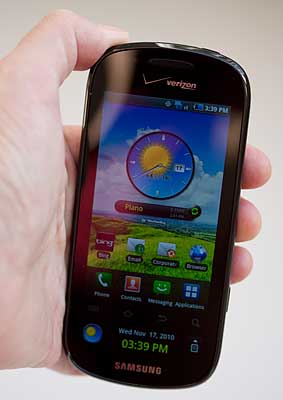
We're fans of Samsung's Galaxy S Android smartphones-- they're very fast, Samsung's TouchWiz 3.0 software has its quirks but adds a lot of value, and those Super AMOLED displays are the best on the market. But Verizon's second Galaxy S phone (the Samsung Fascinate was the first) doesn't make the strong impression we'd hoped for. Sure, it's a very sharp high end phone with a 1GHZ Hummingbird CPU with hardware graphics acceleration, a solid 5 megapixel camera with LED flash and 3G EVDO Rev. A. It even has 2 rather than 1 Super AMOLED displays, and that feature is what sets the Continuum apart and sets off our gimmick detector.
Samsung Continuum
Are 2 Displays Better Than 1?
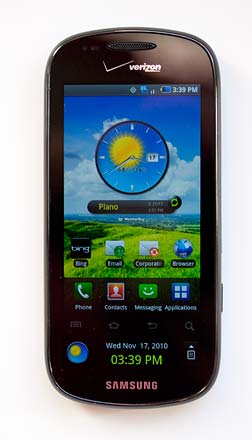
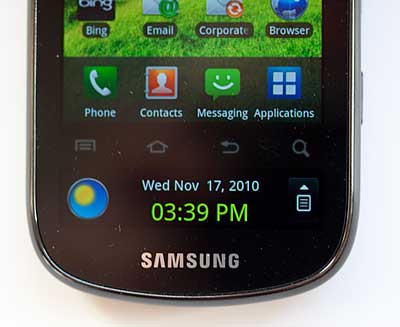
The main display is your usual 800 x 480 Android high end phone deal, with one caveat: it's been shrunk to 3.4 inches vs. the 4" display on other Galaxy S phones. Why? To make room for the 1.8" Super AMOLED Ticker display that lives below the main display. It's not adjacent to the main display and that's a good thing because you'd tend to accidentally touch one display when you were aiming for the other. The usual capacitive Galaxy Android buttons separate the two. As with Samsung's other Galaxy S phones, these buttons are nearly impossible to see unless lighting is good or backlighting is on. But we never touched the buttons accidentally when aiming for the Ticker.
The main 3.4" display is vivid, sharp and extremely colorful as you'd expect from Samsung's Super AMOLED technology. But web page text becomes too small to read without zooming when that many pixels are crammed into a small space. And thanks to the size reductions, the on-screen keyboard (even the included Swype keyboard) is difficult to use. Though the Continuum is a cool enough phone, it loses some of that superphone feel when the main display is smallish.
Samsung Continuum

So does the Ticker make it all worth while? Not so much. It's interesting and decent, but doesn't provide an exceptional new user experience. It's there to provide the basics: weather, date and time, missed calls and new texts (if you swipe the Ticker in a leftward motion), and social networking updates if you swipe right. Social networking and RSS feeds will also wake up the Ticker and display as they come in. If you select an item, for example by tapping on weather or a Facebook status update, the application will launch in the main display since there's no room to fit much info in the lower display. With notifications set to a moderate number of sources, the Ticker didn't seem to significantly impact battery life.
You can control the Ticker's behavior via a dedicated settings section. Therein you can manage social networks (Facebook, Twitter and MySpace), RSS feeds, weather, display and sleep time. You can set the brightness of the Ticker for notifications (off, on or dim) and set Ticker display duration (5 to 20 seconds in 5 second increments). You can also set the Ticker to sleep; for example you can set it to run only from 7am to 11pm so it doesn't wake you up in the night and waste battery power.
We found social networking and a heap of RSS feeds were distracting: the Ticker constantly wakes up to display new status messages and feed items (more than once per minute!). If you have oodles of Facebook pals and a heap of news feeds, it's just TMI in our book, but if you're a social and information junky you might love it. We found the most useful feature was using the Ticker display to control other apps such as background music playback. This is limited to the built-in apps though, so 3rd party apps from the Android Market won't be "Ticker-ized".
Solid Galaxy S Specs
The Continuum is a consummate Galaxy S phone with all the usual trimmings: 3G EV-DO Rev. A, 1 GHz Hummingbird CPU, an OK 384 megs of RAM to run apps and 2 gigs of internal storage (with ~1.6 gigs available). The Continuum scored 849 on Quadrant's benchmark application, which is decent but not among the top Android performers (likely due in part to the phone running OS 2.1 rather than the speed optimized 2.2 Froyo). The smartphone has a microSD card slot and Verizon includes an 8 gig card. There's the usual trio of WiFi 802.11b/g/n, Bluetooth and a GPS as well as Samsung's very good 5 megapixel autofocus camera that can shoot HD 720p video. Slightly disappointing is the Android OS version: it's 2.1 Eclair. No US Galaxy S carrier phones have gotten their 2.2 upgrade yet, though they will at some point. Now that Froyo 2.2 is on quite a few phones and the recently released Samsung Nexus S hit the market with Android OS 2.3 Gingerbread, 2.1 is looking a little old on a high end Android smartphone.
Like other Samsung Galaxy S phones, the Continuum is gloss black plastic with a subtle visual pattern on the back. It's an attractive piece of hardware even if there's no metal to be found. The phone is narrower than other Galaxy S phones and its back is flat with no hump and that means the phone wants to squirm out of your hand like a bar of soap.
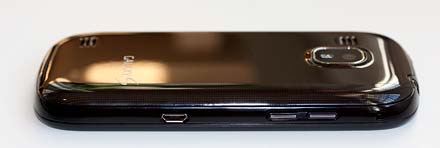
The power button is up top as is the 3.5mm headset jack. The micro USB port and the volume controls are on the left, and the combined camera launcher/shutter button (we love that it has a camera button) and microSD card slot are on the right.
TouchWiz, Custom Apps and Multimedia
Like all Galaxy S phones (we don't include the pure Google Nexus S in this statement), the Continuum runs TouchWiz 3.0. We like TouchWiz more than most Android UI and application enhancement overlays; it's attractive yet it doesn't stomp all over Android the way Motoblur does on Motorola's entry to mid-tier Android phones. The icon palette is arranged in pages and the icons get tasteful square backgrounds-- fine by us. The top menu bar has built-in wireless controls that you can access with a swipe down: handy. Best of all, Samsung, a company that knows a bit about multimedia, has enhanced the otherwise lackluster Google defaults with a more full-featured and attractive UI. They've also expanded file format support since vanilla Android is fairly limited, adding formats like WMV9 and DivX. That means the Samsung Continuum, like all Galaxy S phones, is a great multimedia phone. Music quality is quite good over the surprisingly loud and full speaker, and audio via Bluetooth stereo and wired earbuds is likewise excellent. The display is a bit too small to really enjoy watching movies though, at least compared to its brother the Samsung Fascinate. Media Hub, Samsung's movie and TV show rental/sale portal isn't yet available on the Continuum but should be at some point.
Samsung Continuum
Verizon's Customizations
The good news first: we applaud Verizon for changing the ingrained Samsung Galaxy S and Galaxy Tab browser setting from mobile to desktop. With an excellent web browser on board, why would we want to be redirected to the mobile version of the New York Times homepage as we are on the Samsung Vibrant, Samsung Captivate and other carriers' Galaxy Tab Android tablets?
The not so good part? As we've seen before, Verizon has let Microsoft infiltrate the Google phone thanks to a business agreement with MS. Now some of you may love Bing's web search (err, maybe not?) and we admit that Bing Maps and POI related items are actually top notch, but when we buy a Google phone, it's probably because we want those Google apps on board: Google Search and Google Maps. After all, you can download Bing if you want, but you can't download Google Search. That means you'll need to use Google Voice Search or run the web browser and navigate over to Google.com to do a Google search. The search widget on the home screen uses Bing.com search. Happily you can download Google Maps and Navigation from the Android Market (Google has gotten wise to manufacturers and carriers omitting some core apps and has made them available for download). Gmail, the YouTube player and other Google Android staples remain intact.
Verizon's software includes VZ Navigator, My Verizon Mobile, Skype Mobile, V Cast Music, V Cast Videos and V Cast Tones. The GPS worked well in our tests of VZ Navigator (requires a subscription), Google Maps and Navigation and Bing.

Calling and Data
The Samsung Continuum has good voice quality for both incoming and outgoing voice. Callers couldn't tell we were on a cell phone when we called from peaceful locations like the office and from the car with windows up. When calling from rowdy big box stores, the DSP worked well to filter out noise and reduced outgoing voice quality just a bit (as you'd expect). The Continuum played well with a variety of Bluetooth headsets and the speakerphone is better than average in terms of volume and fullness.
Samsung Continuum
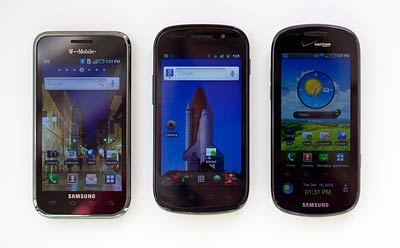
Samsung Android party: the Samsung Vibrant, Nexus S and Samsung Continuum.
The Continuum has 3G EV-DO Rev. A and Verizon's 3G Mobile Hotspot feature that allows you to use your phone as a WiFi access point by sharing its 3G data connection over WiFi. If you wish to use the 3G Mobile Hotspot feature, Verizon Wireless charges an additional $20/month with a 2 gig data allowance.This service shouldn't be confused with the basic WiFi use on the phone: if you turn on WiFi and use that to access the Net on your Continuum, Verizon won't charge you a penny. You only pay for 3G data and 3G data sharing services.
Video Review
Here's our video review of the Samsung Continuum:
Battery Life
Galaxy S phones aren't Energizer bunnies, but the Continuum does better than most. The smaller main display likely improves battery life, and the lower display doesn't seem to impact battery life unless you have new RSS and social network updates coming in every 10 seconds. The Continuum lasted us a day on a charge with moderate use, and we didn't have to plug it in until bedtime. If you use the GPS for an hour or two of navigation, or watch a movie, expect it to need a charge by early evening. The phone has a 1500 mAh Lithium Ion battery that's user replaceable.
Samsung Continuum
Conclusion
If you're a social networking butterfly or are addicted to news feeds, the Samsung Continuum is for you. The timely status and news updates that wake only the Ticker display will leave you tickled. If you're not a social and news junky, go for the Samsung Fascinate on Verizon Wireless-- its larger 4" display makes for a much richer experience. That said, Verizon has recently discounted the still newish Continuum and it's currently selling for $99 with rebate and a contract-- half the price of the Fascinate. That's a pretty good deal. The Continuum is fast and has that irresistible Super AMOLED display as well as Samsung's pleasing TouchWiz 3.0 UI and software. It's a solid high end smartphone, even if the Ticker isn't for us.
Pro: Fast, high end specs, Super AMOLED display. Narrower than other Galaxy S phones which is a plus if you have small hands.
Con: Main display is a bit cramped, Ticker isn't a great step forward in technology unless you're an information and social networking addict. Phone is slippery, Android OS 2.1 won't win the geeks over.